
M3U8 / HLS
How to Test an M3U8 Stream Online
A practical first test for HLS playlists, browser playback, Playback Log clues and access limits.
Last updated: 2026-05-30
An M3U8 stream is usually tested for a simple reason: you want to know whether an HLS playlist can load and play in a normal web browser. The answer is not always the same as “the URL exists.” A playlist may open in a desktop media player but fail in a browser because the browser has stricter rules for CORS, codecs, mixed content, signed URLs and MediaSource playback.
The safest first step is to use a browser-based player such as the M3U8 Player Online. Paste only a public stream or a stream you are authorized to test. Do not paste private customer links, paid video URLs, DRM-protected streams or links copied from sites where you do not have permission to test the source.
Start With the Direct Playlist URL
A useful HLS test starts with the actual playlist URL, normally ending in
.m3u8. A regular webpage URL is not enough, because many video
pages load the playlist later through JavaScript, player configuration or
an authenticated API call. If you paste a webpage instead of the playlist,
the browser player cannot guess which stream you intended to test.
If you manage the video source, confirm that the URL returns playlist text rather than an HTML page, an error page or a redirect to a login screen. A master playlist may point to several variant playlists for different bitrates, and those variant playlists point to media segments. The browser needs access to the playlist and to the segment files.
Run the Browser Playback Test
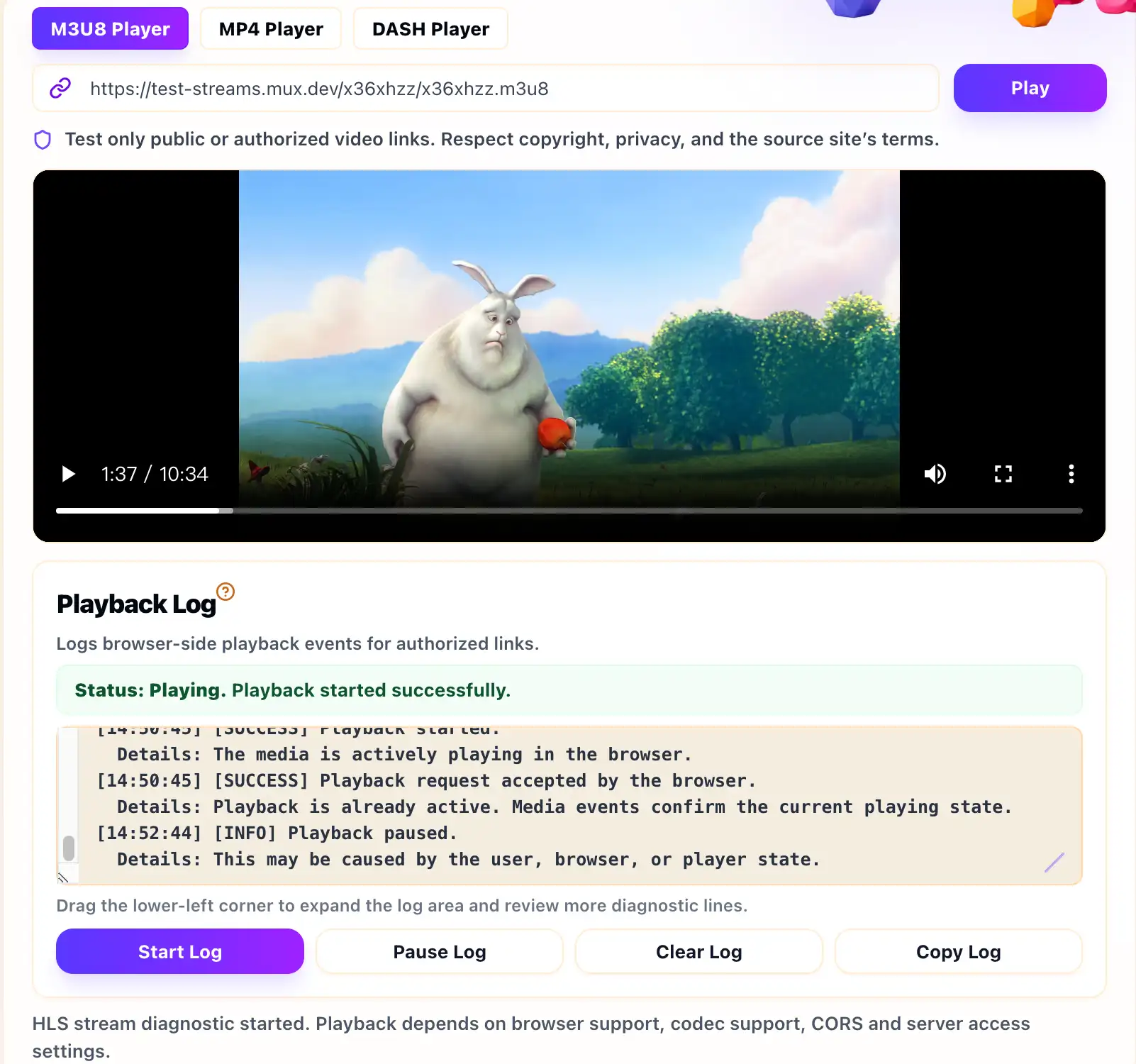
Paste the playlist into the player and click Play. If playback starts, the browser can load enough of the playlist and segments to begin. If playback fails, read the message and the Playback Log before changing the URL. The log can show whether the failure happened early, during playlist loading, while fetching segments or after metadata was available.
A browser-side test is especially useful when you are comparing web playback with VLC or another desktop player. Desktop players are often more tolerant of server headers and may not enforce the same cross-origin rules. A successful VLC test does not guarantee that an embedded web player will work for visitors.
Check Common HLS Failure Points
If the stream does not play, check whether the playlist and segment URLs are still valid. Signed links can expire quickly. Token rules may require a specific referrer, IP address, cookie or user session. A public browser test cannot supply those private credentials unless the source was designed to allow standalone web playback.
Also check CORS headers on every relevant response. For HLS, the first playlist is not the only file that matters. Variant playlists, media segments and encryption key URLs can each fail separately. If one segment is blocked or missing, playback may start and then stop.
Use the Result as a Clue, Not a Full Diagnosis
An online player can tell you what the browser experienced, but it cannot see everything happening on your origin server, CDN, firewall or license system. If the Playback Log points to a network, CORS or media error, use that clue with your server logs and CDN configuration. For a broader explanation of browser-specific failures, read why an M3U8 stream can work in VLC but not in the browser.
Example Playback Log Signals
A healthy browser-side test usually shows metadata or playback events after the playlist loads. A blocked test may show network or media errors before the player reaches a ready state.
[INFO] Loading HLS stream
[INFO] Manifest parsed
[INFO] Media metadata loaded
[SUCCESS] Playback started
If the log stops around manifest or fragment loading, check the browser network panel for the exact request that failed. That request is often more useful than the original URL alone.
Quick HLS Test Checklist
- Use the direct M3U8 playlist URL, not a normal webpage URL.
- Confirm the link is public or authorized for browser playback.
- Check the master playlist, variant playlist and segment requests.
- Verify HTTPS, CORS headers, codec support and token expiry.
- Compare the Playback Log with your server or CDN logs.
Related Guides
What Is an M3U8 File?
A plain-English explanation of M3U8 playlists, HLS segments, variants and safe testing boundaries.
Why an M3U8 Stream Works in VLC but Not in the Browser
A common HLS troubleshooting guide for streams that play in VLC but fail in web players.
How to Fix M3U8 CORS Errors
A careful CORS guide for stream owners, with browser-safe checks and no bypass advice.